DOES YOUR CALIFORNIA BUSINESS WEBSITE NEED A PRIVACY POLICY?

DOES YOUR CALIFORNIA BUSINESS WEBSITE NEED A PRIVACY POLICY?
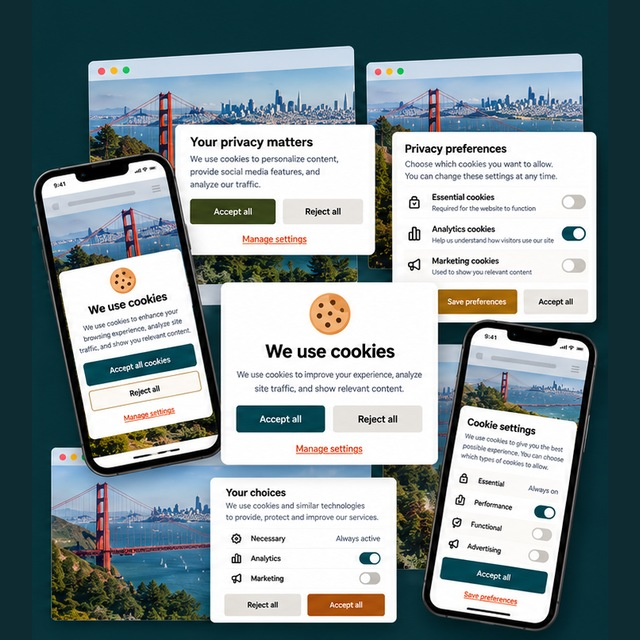
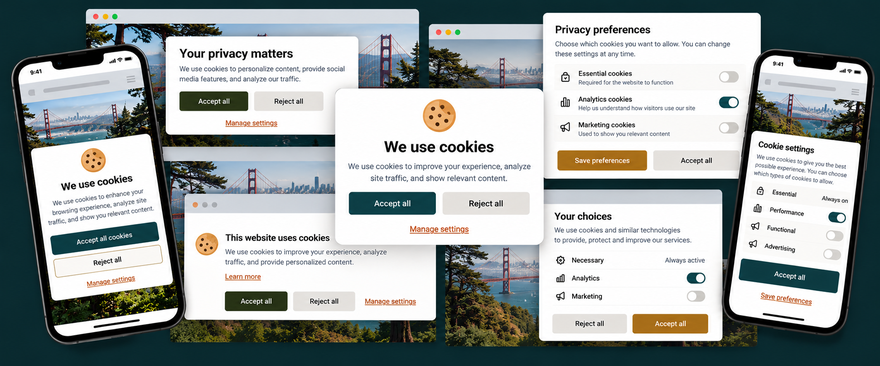
YOUR SITE NEEDS A PRIVACY POLICY. HOW ABOUT THAT ANNOYING COOKIE POPUP?


If your website collects visitors’ names, email addresses, or other personal information, the answer is generally yes. California law requires it, even for small businesses.

Information current as of October 30, 2026. Privacy laws and requirements may change. This article provides general information, not legal advice.

EVEN A SIMPLE CONTACT FORM COUNTS

California law requires commercial websites that collect personally identifiable information from California residents to prominently display a privacy policy.

You don’t need to operate a large company, sell products online, or collect credit card information for this requirement to apply.

Even an ordinary contact form requesting someone’s name and email address is enough.

WHAT SHOULD YOUR PRIVACY POLICY INCLUDE?

Your privacy policy should explain:

  • What personal information your website collects.
  • How that information is used.
  • Which outside companies or services may receive it.
  • How visitors can contact you about their information.
  • How changes to your privacy practices will be communicated.

California law requires some additional disclosures, including certain information about online tracking.

If your website uses Google Analytics or Google Ads conversion tracking, those services should also be addressed. Even when you’re not selling customer information or using advertising remarketing, outside services may process visitor data.

A privacy policy should accurately describe what your particular website does. Copying a generic policy from another business may leave important information out—or claim practices that aren’t yours.

WHERE DOES THE POLICY GO?

Fortunately, this part is simple.

Publish a dedicated Privacy Policy page and include a clearly labeled link in your website footer, accessible throughout the site.

The policy doesn’t have to be intimidating, but it needs to be accurate, complete, and understandable.

A SMALL PAGE WITH AN IMPORTANT PURPOSE

A privacy policy isn’t just another legal formality. It tells visitors how your business handles their information and demonstrates that you take their privacy seriously.

If your business website collects personal information, make sure it has a properly written privacy policy.

At Metapix, we help small businesses identify what information their websites collect and prepare clear privacy disclosures that reflect their actual practices.


DOES YOUR WEBSITE REALLY NEED THAT ANNOYING COOKIE POPUP?

YOUR SITE NEEDS A PRIVACY POLICY. HOW ABOUT THAT ANNOYING COOKIE POPUP?


For many small California business websites, no. California doesn’t automatically require cookie-consent popups simply because a website uses ordinary cookies or traffic analytics.

Information current as of October 30, 2026. Privacy laws and requirements may change. This article provides general information, not legal advice.

You visit a website looking for something simple. A phone number. Business hours. Maybe you want to book an appointment.

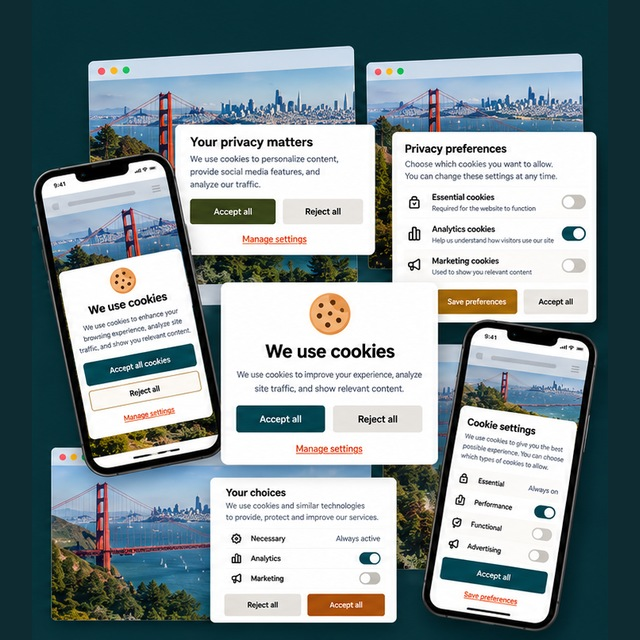
But first, a popup demands that you accept cookies, reject cookies, or manage your privacy preferences.

Choose “Manage Preferences” and suddenly you’re faced with mysterious switches and technical jargon.

All you wanted was a haircut.

WHAT ARE COOKIES, ANYWAY?

Cookies are small pieces of information stored in your browser. Some help websites function, while others remember preferences, measure traffic, or support advertising.

A typical small-business website might use essential cookies, Google Analytics to measure website traffic, and Google Ads conversion tracking to see whether advertising generates inquiries.

Using these technologies doesn’t automatically mean a California business needs a cookie-consent popup.

However, certain advertising practices, privacy laws, or tracking technologies may require additional consent or opt-out choices. What matters is how your website actually operates.

THEN WHY DO SO MANY WEBSITES HAVE THESE POPUPS?

There are several reasons, and not all involve legal requirements.

1. EUROPEAN PRIVACY LAWS

European privacy rules generally require consent before using many nonessential cookies. Those requirements don’t automatically apply to local California businesses.

2. ONE-SIZE-FITS-ALL SOFTWARE

Cookie-consent plugins are easy to install, and developers sometimes use them by default. Large companies may also apply the same privacy settings worldwide, whether they’re necessary in every location or not.

3. ADVERTISING TRACKING

Websites using remarketing and other extensive tracking technologies may need additional privacy controls. But not every website uses these technologies.

4. FEAR OF LAWSUITS

Some businesses install popups as a precaution against privacy-related lawsuits, even when a particular law doesn’t expressly require them.

The irony? Having a cookie popup doesn’t automatically make a website legally compliant.

WHAT SHOULD A SMALL CALIFORNIA BUSINESS DO?

Consider a local salon, designer, or real estate business using a contact form, Google Analytics, and perhaps Google Ads conversion tracking, but no remarketing.

For a website like this, a cookie popup isn’t automatically required. The business should disclose its tracking practices and determine whether any additional privacy controls are necessary.

Even without advertising remarketing, some website tracking technologies can create privacy-related legal risks. Recent changes to California law reduce certain types of lawsuits but don’t eliminate those risks. That’s another reason to understand exactly what your website collects and shares.

Businesses serving European customers or using more extensive tracking may have different obligations.

Don’t install a cookie popup just because everyone else has one. First determine whether your website actually needs it.

BETTER PRIVACY DOESN’T HAVE TO MEAN MORE POPUPS

Visitors deserve to know how their information is collected and used. But forcing them through an unnecessary consent screen doesn’t automatically protect their privacy.

Your website should respect visitors’ privacy, not make them work unnecessarily hard to visit your business.

At Metapix, we believe in straightforward privacy practices, appropriate protections, and websites that let visitors get on with what they came to do.


IS YOUR WEBSITE ACCESSIBLE? TWO VERY GOOD REASONS IT SHOULD BE.

IS YOUR WEBSITE ACCESSIBLE? TWO VERY GOOD REASONS IT SHOULD BE.


You spend time and money getting people to your website. Google Ads. Social media. Email campaigns. Beautifully designed marketing collateral with QR codes and more.

But once someone arrives, can they actually use it?

Can they read your service descriptions? Navigate your menu? Complete your appointment form?

For visitors with disabilities, those everyday tasks can become obstacles when a website hasn’t been designed and tested with accessibility in mind.

There are two compelling reasons to pay attention: you want every potential customer to have a good experience, and you want to reduce the possibility of an expensive legal dispute.

FIRST, WHAT IS WCAG 2.2 AA?

The Web Content Accessibility Guidelines, or WCAG, are international standards for making websites more accessible to people with disabilities. Version 2.2, Level AA, gives website owners and developers a specific set of requirements to work toward.

In practical terms, that means addressing questions such as:

  • Does text have sufficient contrast against its background?
  • Can visitors use menus, buttons, and forms with a keyboard?
  • Do meaningful images have appropriate text alternatives for people using screen readers?
  • Are form fields clearly labeled, with understandable error messages?
  • Can visitors enlarge content without losing information or functionality?
  • Can moving content be paused when required?

These details affect whether someone can learn about your business and take the next step.

REASON #1: GIVE EVERY POTENTIAL CUSTOMER A GOOD EXPERIENCE

Imagine someone finds your business on Google. They’re interested in your services and ready to book.

But your appointment form won’t work with their keyboard. Or the pale gray text is difficult to read. Or their screen reader announces a series of buttons without explaining what those buttons do.

They may leave and contact another business.

You probably won’t know why.

For a salon, medspa, Realtor, jeweler, or other local business, that could mean losing a valuable customer after your marketing has already done its job.

Accessibility also benefits people whose needs change with age or a temporary injury. Someone recovering from hand surgery may have trouble using a mouse. Someone with declining vision may need to enlarge your pages.

Clear navigation, readable text, and usable forms help more people feel comfortable doing business with you.

Getting someone to your website is only part of the job. They need to be able to use it once they arrive.

REASON #2: EVEN A QUESTIONABLE LAWSUIT CAN COST REAL MONEY

The other reason is less pleasant.

Website accessibility litigation has grown substantially over the past decade, with thousands of lawsuits filed annually in federal courts alone. Those totals don’t include state-court lawsuits, legal demand letters, or disputes settled privately before a lawsuit is filed. The financial risk to businesses extends well beyond the cases that reach court.

Accessibility claims can involve real barriers that deserve correction. Business owners may also face allegations they dispute or believe are frivolous.

Either way, dismissing a claim in your own mind doesn’t make it disappear.

Even if you believe a lawsuit has no merit, you may still need to hire an attorney to defend your business.

That means paying someone to review the allegations, explain your options, prepare a response, and potentially negotiate or litigate.

HOW MUCH COULD THAT COST?

A recent California attorney-rate report lists an average hourly rate of $398 for civil litigation lawyers. An individual attorney’s rate may differ considerably.

Reviewing the allegations, discussing your options, examining website findings, preparing a response, and communicating with the other party’s attorney could add up to 10–20 hours. At a rounded rate of $400 per hour, that would mean $4,000–$8,000 in legal fees.

This is an illustrative estimate based on assumed hours, not a published average for accessibility cases. Actual fees will depend on the claim and the work required.

That estimate also excludes settlement payments, court costs, accessibility experts, and website repairs. A prolonged defense could cost substantially more.

For a small business, even the initial expense can be painful.

DOES MEETING WCAG 2.2 AA PREVENT LAWSUITS?

No. It provides a useful technical target, not a guarantee against being sued.

There’s also a distinction between WCAG and the law. The Department of Justice says the ADA applies to the online goods and services of covered businesses open to the public. Its guidance points to WCAG as a useful accessibility resource, but WCAG 2.2 AA is not a blanket federal ADA requirement for every private business website. The legal requirements applicable to a particular business can vary.

Our practical recommendation is to work toward WCAG 2.2 AA, correct confirmed barriers, and continue checking your website as it changes.

That addresses the problems that can lead to complaints while improving the experience for your customers.

START WITH AN ACCESSIBILITY AUDIT

You don’t need to become an accessibility expert to make your website more welcoming.

Upon request, Metapix can perform a website accessibility audit and provide a report identifying barriers, explaining how they affect visitors, and prioritizing recommended corrections. We can then provide a quote for addressing those barriers.

Our review combines automated tools with hands-on testing of how visitors navigate and use your website, particularly important features such as contact forms, appointment booking, and checkout.

Automated warnings need interpretation. We review findings to distinguish confirmed barriers from warnings that don’t require changes. The goal is to make your website easier to use and focus your budget where it matters.

KEEP YOUR WEBSITE WELCOMING

Accessibility deserves ongoing attention. A new booking system, redesigned menu, or software update can introduce problems, so periodic reviews help protect the improvements you’ve made.

Metapix can help you evaluate your website’s accessibility and plan practical improvements as part of regular website maintenance.

There are two good reasons to get started: giving more potential customers a positive experience and reducing the risk of costly legal disputes.

We’ve built an AI agent specifically to help review websites for WCAG 2.2 AA accessibility compliance. Contact us to request an accessibility audit and report, followed by a quote for recommended corrections.

This article provides general business information, not legal advice. Consult a qualified attorney about your business’s legal obligations or any claim you receive.


AI FINDS YOU. GOOGLE CONFIRMS YOU.

AI FINDS YOU. GOOGLE CONFIRMS YOU.


AI search is changing how customers discover local businesses. But new research suggests something important for small business owners:

Being recommended by AI doesn’t mean the search is over.

In fact, consumers frequently take an AI recommendation and then check Google, Google Maps, social media, and the business’s own website before making a decision.

That means your Google Business Profile and website may be more important in the age of AI, not less.

AI IS BECOMING PART OF LOCAL SEARCH

Consumers are increasingly asking ChatGPT, Gemini, and other AI tools questions such as:

  • “Find a good medspa near Los Gatos.”
  • “Who can help my parents downsize in San Jose?”
  • “What’s a well-reviewed estate attorney near me?”
  • “Where can I find a salon that specializes in curly hair?”

BrightLocal found that 31% of consumers now use AI at least monthly for local business recommendations, and 23% used an AI tool somewhere during their most recent local business search.

AI clearly matters.

But here’s the part small businesses shouldn’t overlook…

CUSTOMERS ARE DOUBLE-CHECKING AI

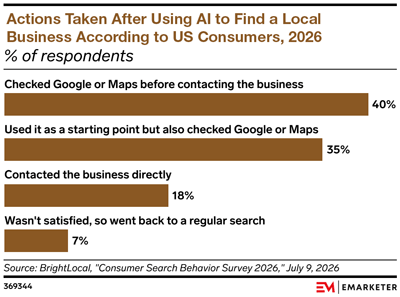
An eMarketer analysis of BrightLocal’s 2026 consumer research found that 75% of consumers who used AI to find a local business checked Google or Google Maps before contacting the business.

The chart gets even more interesting when looking specifically at people who started their search with an AI tool:

AI FINDS YOU. GOOGLE CONFIRMS YOU.

  • 35% used it as a starting point but also checked Google business listings
  • 18% contacted the business directly
  • 7% weren’t satisfied so went back to regular search

Source: eMarketer analysis of BrightLocal consumer research, 2026.

In other words, AI is often creating the shortlist. Consumers are still doing their homework before making the call.

That’s particularly important for local businesses, where customers want to confirm things AI may not present completely or accurately:

  • Is the business really nearby?
  • What are its current hours?
  • Does it have good reviews?
  • What does the business actually specialize in?
  • Does the website look professional and current?
  • Can I see photos, staff credentials, pricing, services, or examples of their work?
  • How do I contact or book them?

YOUR GOOGLE BUSINESS PROFILE IS STILL YOUR LOCAL STOREFRONT

Google describes its Business Profile as a business’s local storefront on Google Search and Maps. It can contain your location, hours, phone number, website, photos, services, reviews, booking links, and other information customers use to make a decision.

So imagine ChatGPT recommends your business.

The customer then Googles your name.

What happens next?

An incomplete profile, outdated hours, poor photos, unanswered reviews, or inconsistent contact information can quickly undermine the confidence AI just helped create.

A strong Google Business Profile should include:

  • Complete and accurate contact information
  • Current business hours
  • Correct service categories
  • Your website and appointment links
  • Good-quality current photos
  • Clearly described services
  • A healthy stream of recent reviews
  • Responses to customer reviews

Google also states that complete and accurate Business Profile information improves a business’s ability to appear in relevant local searches.

AND DON’T NEGLECT YOUR WEBSITE

There’s another reason your website remains critical.

A September 2026 BrightLocal study analyzed more than 200,000 local AI searches and found that 93% of the unique domains AI systems used as sources were business websites. Business websites accounted for 42% of all citations.

That’s a fairly compelling answer to anyone wondering whether websites still matter in an AI-search world.

Your website isn’t simply where someone lands after finding you on Google.

It can also be part of the information AI uses to understand and recommend your business in the first place.

A robust local-business website should clearly explain:

  • What you do
  • Where you provide your services
  • Who you serve
  • Your specific specialties
  • Your experience and credentials
  • Frequently asked questions
  • Why someone should choose you
  • How to contact, schedule, or visit you

Specific, useful content gives both search engines and AI considerably more to work with than a few generic paragraphs of marketing copy.

And because BrightLocal found that 73% of local business searches begin on a mobile phone, your website also needs to be fast, readable, and easy to contact from a small screen.

AI, GOOGLE, AND YOUR WEBSITE WORK TOGETHER

The old customer journey might have looked like this:

Google → Website → Call

The emerging journey may look more like:

ChatGPT → Google → Reviews → Website → Call

Or:

Google AI → Maps → Website → Appointment

Or any number of other combinations.

BrightLocal found that 75% of consumers used more than one channel during their most recent search for a local business.

That’s the bigger lesson.

AI isn’t necessarily replacing Google or your website. It’s becoming another doorway into a more complicated customer journey.

WHAT IT ALL MEANS

Yes, your business should be paying attention to ChatGPT, Gemini, Google AI, and other emerging search tools.

But don’t make the mistake of focusing on AI visibility while neglecting the places customers go to verify what AI tells them.

Keep your Google Business Profile complete and current.

Keep building reviews.

And maintain a robust website that clearly explains what you do, where you do it, and why someone should trust you to do it.

AI may introduce your business, but Google and your website still determine whether the customer chooses you.


IS IT TIME TO START ADVERTISING ON CHATGPT?

IS IT TIME TO START ADVERTISING ON CHATGPT?


For most small local businesses, it probably isn’t time to move advertising dollars from Google to ChatGPT. But it is time to start paying very close attention.

ChatGPT Ads is now a real advertising platform, with local geographic targeting and ads matched to the context and intent of a user’s conversation.

That could become very valuable.

But for local businesses, Google still has one particularly big advantage.

GOOGLE IS ALREADY BUILT AROUND LOCAL BUYING INTENT

When someone needs a plumber, Realtor, medspa, attorney, restaurant, or other local service, Google is already deeply embedded in the process.

A single search can provide:

  • Google Maps and distance
  • Reviews and ratings
  • Hours and phone numbers
  • Directions
  • Website links
  • Google Business Profiles
  • Paid ads
  • AI-generated summaries

Most importantly, people already have years of experience using Google when they’re ready to find and contact a local business.

ChatGPT frequently enters the buying process differently.

Instead of searching “medspa Los Gatos,” someone might ask:

“What treatments work best for sun damage without making me look overdone, and how do I find a good provider near me?”

That’s a valuable potential customer, but it represents a different kind of search.

For now, we would be cautious about moving money away from a Google Ads campaign that is already generating good local leads.

BUT ADVERTISING ISN’T THE ONLY CHATGPT OPPORTUNITY

This may actually be more important.

Someone can ask ChatGPT:

  • “Who are some good senior relocation specialists near Los Gatos?”
  • “What medspas near Campbell specialize in natural-looking skin rejuvenation?”
  • “Find an estate attorney in San Jose who works with probate.”

ChatGPT can search the web and recommend businesses in its answers. Those recommendations are separate from advertising.

So before worrying about whether you should advertise on ChatGPT, there’s another question you should probably ask:

When someone asks ChatGPT about businesses like yours, does it know that your business exists?

SEO ISN’T DEAD. ADD GEO TO IT.

Search Engine Optimization remains important. It is now expanding to include Generative Engine Optimization, or GEO: helping AI systems understand who you are, what you do, where you do it, and why your business is relevant.

The same fundamentals still matter:

  • Clearly written service pages
  • Strong local and location-specific content
  • Accurate business information
  • Useful original blog content
  • Frequently asked questions answered clearly
  • Good website structure and crawlability
  • Reviews, citations, and credible mentions elsewhere online

In other words, GEO doesn’t replace SEO. It broadens what your website needs to accomplish as people increasingly use AI alongside conventional search.

THE BOTTOM LINE

ChatGPT advertising is worth watching and may already be worth testing for some businesses. But Google still has a substantial advantage when a local customer is actively searching and ready to call, visit, or book.

The more immediate issue affects every business, whether you ever purchase a ChatGPT ad or not.

Your customers are beginning to ask AI where to go, what to buy, and whom to trust.

When they ask about a business like yours, will AI find you?

A website that clearly explains what you do, where you do it, and which customer problems you solve gives both traditional search engines and AI systems better information to understand your business and incorporate your website into relevant search results and AI-generated responses.

That’s why strong SEO and GEO aren’t just about Google rankings anymore. They’re about making sure your business is visible wherever your next customer chooses to search.


PLAN AND ORDER NOW FOR HOLIDAY MARKETING

holiday marketing table scape

After over twenty years of helping clients with last-minute holiday panic marketing, these are some of the things we all often regret not addressing in September.

As autumn begins each year, we remind our clients to start prepping and ordering gift bags, greeting cards, holiday decor, gift certificates, gift tags, posters, etc, and plan online marketing: e-mail campaigns, seasonal website changes, and Google Ads campaigns.

Besides setting yourself up for a less stressful fourth quarter, preparation in September means free or economy shipping prices instead of ridiculously marked-up rush shipping for last-minute orders. (Reminder of our rush project policy.) You’ll also have more time to jump on the inevitable last-minute holiday opportunity or crisis.

SEPTEMBER TO-DO

Start a Halloween through mid-January calendar showing holidays, planned marketing campaigns, events, team meetings/training, and drop-dead dates.

  • Why into January? Because there’s often a drop-off in business in the new year. September’s the time to check into your previous January numbers (what worked, what did not) and also what your competition previously did for Q1 marketing. Use the heavy holiday traffic to share online or print January bounce-back offers.
  • Note drop-dead dates by working backwards from when you need assets finalized and in-hand. Remember that free or economy shipping may take longer over the holidays and plan accordingly.* For example, if you want a printed bring-back card to include with Halloween treats, note placing the order with the printer by October 17th, and working back from that, mark your calendar for October 3rd as your day to start developing the asset.
  • Calendar reminders to update your holiday hours over all platforms (especially Google Business Profiles).

Research community calendars for events and reach out to potential partners and charities early. When you move forward be sure to plan offers that are trackable and unique to each event/partnership/charity so you have data for informed decisions next year.

Holiday Marketing

Prep a stash of beautiful, printed hand-outs with a generic offer so you have an inventory ready and can jump on last-minute partnering opportunities without needing to rush a design and print order.

As you plan your holiday promos, be sure to use a unique, trackable code and/or a unique promotion for each offer. That way, next year, you’ll have data on what promo worked and what you can drop and replace with a different idea. This can be tricky, so check in with us to talk this through. Basically, if you do 10% off on all promos, print and online, throughout the holidays, you won’t know the difference between a Black Friday partner campaign that worked and a SMS campaign that did not.

Check your gift card inventory now! (Gift card companies may have five week lead-times—and possibly longer—October through January.)

Review your assets library. Do you have the photos, video clips, or artwork you’ll need to support your holiday marketing: gift sets, products, staff, seasonal services, and decorated locations?

Start penning your Thanksgiving gratitude message to customers, your holiday greetings, and your Happy New Year wishes so they are ready for social media and email campaigns. During the holiday rush, you won’t have as much bandwidth for sincere message scripting.

Are you sending cards, party invitations, and/or gifts to your clients and partners this year? Let’s get on that too!

Selling gifts? Check your inventory and the lead times of items you wish to stock. From October onwards, order fulfillment and shipping from your vendors may take additional time. Also, be sure you stock plenty of festive packaging and shipping supplies if you plan on mailing items.

Sadly, if you are hosting a holiday party and have not booked your caterer, entertainment, and venue, September may be too late. Skipping the printed invites and going online is a good option to save a few weeks.

Don’t forget your team! The holidays may be extra stressful for them too, so set them up for success and a bit of joy with prepared customer service scripts, holiday season incentives, and share with them your holiday marketing how-tos and goals. Start gathering their holiday plans for your shift schedule.

Take time in October to reach out to your customers (especially your VIPs) with reminders to book their holiday appointments early, before your books fill up.

Plan software updates or IT work in advance. Avoid major website migrations, email-platform changes, computer replacements, or other potentially disruptive technology projects during the busiest part of the holiday season unless they’re essential.

Audit your website now! On mobile and desktop devices, check contact forms, booking links, gift-card purchase links, online ordering, responsive display, checkout, promotional codes, and confirmation emails. A holiday campaign is wasted if the conversion path is broken.

With busy holiday traffic, assume your email and text sign-ups will increase. Be sure your drip campaigns are running smoothly, so in the background, you hook these new customers programmatically.

As you plan your holiday offers and gift-giving promos, make your landing pages early. Not only does this lighten your load during the holidays, it helps you walk through the offer, planning clear language, that there’s a workable CTA, set up promo codes in your system, and include all the needed fine print to protect your customer-facing staff and your bottom line. Wording used on the landing page can then be fed into your AI editor and condensed with little effort on your part to fit Instagram, email campaigns, texts, etc.

No stress, added costs, and drama this year — let’s get started on marketing’s silly season work now! We’ve plenty of ideas and sources for product.

MenloVille Shoppe decorated for the holidaysHere’s some key events to keep in mind…

OCTOBER

Halloween

NOVEMBER

Daylight Saving Time ends

Veterans Day

Thanksgiving

Black Friday

Small Business Saturday

Cyber Monday

GivingTuesday

DECEMBER

Pearl Harbor Remembrance

Green Monday

Festivus

Hanukkah

Christmas Day

Boxing Day

Kwanzaa

New Year’s Eve

*This often trips up our clients—planning two weeks for free or economy shipping saves so much money and stress. Ideally, aim for three weeks for shipping so you have time to react if an exchange or reprint is needed.

SMS (TEXT) MARKETING WITH CONSTANT CONTACT – A BEGINNER’S GUIDE

Summary First

For the busy small business owner!

  • Any text marketing requires a one-time, detailed licensing process.
  • Constant Contact is a great way to dip your toes into text marketing, but if it proves successful, you may soon wish to upgrade to a platform with more features, such as image support and more refined reporting. More on these platforms below.
  • Small businesses offering services may be better suited to Constant Contact’s text services than retail businesses.
  • With a short 160-character limit, we recommend using a landing page for details, a clear call to action, and fine print.

SMS – Short Message Service – a standard text message sent between mobile phones.

MMS – Multimedia Messaging Service – supports multimedia attachments in your text, such as photos, videos, GIFs, and audio, and allows longer message content.

Cost Before the Details

One-Time

There are so many variables in the one-time setup process, including a landing page template, that quoting the account setup here is not possible. For a quote to set up your Constant Contact account for SMS marketing, please set up a call with John.

Monthly

Constant Contact’s pricing, starting at $40 per month, is based on list size and the number of texts sent per month.

Each Launch

Each individual SMS campaign includes:

  • Communications regarding offer development, content, best practices, fine print, edits, and approvals
  • Writing copy for the text and landing page
  • Adding text and images to the landing page template
  • Testing
  • Launching

This is also a detailed process, but it becomes more efficient with repetition. As we learn your voice, preferences, and approval patterns, each campaign becomes easier to produce and more cost-effective. Initially, a rough estimate is 45 minutes to one hour per text. Our current hourly rate is $155.

Final Notes on Cost

We do not bill for a basic report delivered to your email a few days following each launch. More in-depth reporting is billed at our usual hourly rate.

It is possible to skip the landing page. Doing so saves setup costs and lowers the price of each campaign. You can link to any web page, but it is very difficult to use only 160 characters while also including the fine print needed – such as expiration dates, promo codes, and restrictions – to protect your business. Texts with a landing page perform better, generate higher-quality contacts, and require less in-store customer service.

Constant Contact

Constant Contact SMS marketing is best viewed as a lower-cost, lower-complexity entry point. The pros are affordability, convenience, easy integration with an existing Constant Contact account, and enough basic functionality to test simple campaigns.

The cons are fewer features, more basic reporting, no true MMS capability, and a registration process that can be frustrating if your business information is not perfectly aligned.

For many small businesses, that may be enough. Constant Contact can be a good first step to see whether bulk SMS campaigns are effective for your audience. But if texting proves to be viable and important, you may eventually need to switch to a more costly service with stronger reporting, MMS, automation, two-way conversation tools, and deeper sales or customer management features.

Constant Contact vs. Other Services

Constant Contact costs much less than many larger competitors, but it also does less. Platforms such as Podium, SimpleTexting, EZ Texting, Text Request, and Twilio generally offer stronger automation, richer integrations, advanced reporting, two-way messaging tools, and MMS support.

Podium is built more as a customer communication and lead conversion platform, combining texting with reviews, AI-assisted follow-up, inbox tools, and sales-oriented workflows. That can be valuable, but it usually comes with a much higher monthly cost.

Pros and Cons

Cost and Features Compared

The biggest advantage is cost. If you already use Constant Contact for email marketing, adding SMS can be an inexpensive way to test whether your audience responds to text campaigns. Some plans include a starter message allotment, and smaller add-on tiers are available for lighter usage. That makes it attractive for businesses still building an opt-in mobile list or sending occasional promotions.

The downside is the limited feature set. Constant Contact’s reporting covers useful basics such as sends, successful deliveries, bounces, unsubscribes, and URL clicks. However, it is not as detailed as platforms built for broader customer communication and sales tracking.

Podium and other larger systems may provide deeper dashboards, reply tracking, lead management, team inbox features, review generation tools, AI-assisted responses, and stronger integrations.

Another major limitation is multimedia messaging:

  • Constant Contact SMS is text-only. It is designed for plain text messages and links, not native image, video, GIF, or audio attachments.
  • SMS is short by design. A standard SMS message is limited to 160 characters per segment. Longer messages can be sent, but they are split into multiple billable segments.
  • MMS is different from SMS. MMS supports multimedia attachments such as photos, videos, GIFs, and audio, and allows longer message content.
  • This matters for marketing. If your campaigns depend on sending product photos, event graphics, coupons, before-and-after images, or branded visual promotions directly inside the message, Constant Contact may feel limited.
  • The workaround is linking. You can still link to a web page, image, video, landing page, or offer, but that is not the same as sending media directly in the message.
  • Competitors may offer more. Larger SMS platforms often include MMS support, richer creative options, and more advanced campaign tools, usually at a higher monthly cost.

One-Time Approval Process

A commitment of time and patience.

One part of SMS marketing that often surprises business owners is the approval process. Before sending campaigns, businesses must register so carriers can verify that the sender is legitimate and compliant.

That means gathering legal business details, your EIN or tax ID when applicable, official business name, physical address, website or business page, privacy policy, terms information, and proof that contacts are opting in. In practical terms, expect to gather records such as your business license and EIN documentation so your submission matches official records.

The approval process can take up to seven business days or longer in resubmission situations. Small discrepancies can cause rejection, including differences between your legal business name, address, EIN records, website information, or other registration details.

A minor mismatch can mean correcting the information and submitting it again. Expect a time commitment of at least a couple of hours, especially if you need to gather documents, verify legal information, update your privacy policy, or troubleshoot a rejection.

Thank You

We’ll guide you through! We’ve mastered all these details so you don’t have to.

We hope all this information has helped.

Contacting us puts you under no obligation – set up a chat with John, and we can see if we’re a good fit to help you with text marketing, either SMS with Constant Contact or MMS with another platform.


EMAIL MARKETING METRICS ARE FALSE (AND WHAT YOU SHOULD MEASURE INSTEAD)

WHY YOUR EMAIL MARKETING METRICS ARE LYING (AND WHAT YOU SHOULD MEASURE INSTEAD)


For years, reporting on open rates and clicks by mail marketing platforms, like Mailchimp and Constant Contact, was reliable indicators of engagement. Today, they tell only part of the story.

If you’ve noticed unusually high open rates or clicks that don’t seem to translate into website visits, phone calls, or sales, you’re not imagining things. Modern email privacy features and cybersecurity tools routinely inflate these metrics.

What Counts as an Open?

An open is recorded when a tiny invisible tracking image inside an email is downloaded. Years ago, that usually happened only when a real person opened the message.

Why Open Rates Are Inflated

Apple’s Mail Privacy Protection often downloads tracking images automatically, making emails appear opened even if they were never read. Corporate email security systems may also download images while scanning incoming mail for threats. One recipient using multiple devices can generate multiple opens as well.

Why Click Rates Can Be Inflated

Many business email security platforms automatically visit every link in an email before delivering it to the recipient. Their goal is to detect phishing sites and malware—not to interact with your marketing. Those automated visits can be recorded as clicks.

They’re Not Bad Bots

Most of this activity comes from legitimate privacy and security services provided by Apple, Microsoft, Google, Proofpoint, Mimecast, Barracuda, Cisco, and others. They’re protecting users, not trying to distort your reporting.

What Should You Measure Instead?

Treat open rates as a trend rather than a precise measurement. Focus more attention on unique clicks, website engagement after the click (Google Analytics is more important than ever), form submissions, appointments, purchases, replies, and other real business outcomes. Those metrics are far more meaningful than a headline open rate.

The Bottom Line

Email marketing remains one of the highest-performing digital marketing channels. The difference is that success is no longer measured by opens alone. Modern marketers should view opens as a rough indicator of deliverability and compare campaigns over time, while making decisions based on conversions and genuine customer engagement.


TEXT MESSAGING TIPS: ANIMATION MAY TRIGGER UNSUBSCRIBES

TEXT MESSAGING TIPS: WHY ANIMATED GIFS CAN TRIGGER MORE UNSUBSCRIBES


There are many ways marketing a medspa differs from marketing to other service businesses. This blog is about a medspa industry-specific text marketing singularity. (If you are curious about how animated GIFs may play a role in your business’ marketing, please schedule a complimentary call with John.)

In retail, and most service business, marketing, animated GIFs can increase clicks and capture attention in crowded inboxes and social feeds. In medspa marketing, however, the opposite is often true.

If you have noticed a spike in unsubscribes after switching your MMS campaigns from static images to animated GIFs, the issue may have less to do with the quality of the animation and more to do with how medspa patients make decisions—and how they expect to be marketed to.

Medical aesthetics is a trust-driven business. What works for an online clothing retailer or restaurant promotion does not necessarily translate to injectables, laser treatments, chemical peels, or skincare services.

Trust Matters More Than Attention

Medspa patients are purchasing more than a treatment. They are purchasing confidence in your expertise, safety protocols, and aesthetic judgment.

Static images naturally support those expectations. A beautifully photographed treatment room, polished product image, or elegant before-and-after photo communicates professionalism and clinical credibility.

Animated GIFs can unintentionally communicate something very different. Even well-designed animations may feel promotional or gimmicky when delivered by text. Movement immediately draws attention, but attention is not always positive—particularly when patients are evaluating premium medical services.

For luxury and medical brands, sophistication often comes from restraint.

Text Messages Are Personal Space

Unlike email or social media, SMS and MMS messages arrive in one of the most personal digital spaces consumers have: their text inbox.

People generally reserve text messages for friends, family, appointment reminders, and essential notifications. Because of that, recipients often have a lower tolerance for anything that feels overly promotional.

A static image allows patients to understand the message quickly and decide whether to engage. An auto-playing animated GIF introduces movement and visual noise the moment the message is opened.

That extra sensory input can make the campaign feel intrusive or high-pressure. Rather than creating excitement, it may create friction—and in text marketing, friction often leads to a simple response: “STOP.”

Patients Want Time to Evaluate Results

Aesthetic treatments are highly visual purchases. Patients often spend significant time examining before-and-after photos and treatment outcomes before scheduling an appointment.

Static images support this behavior by allowing recipients to:

  • Pause and inspect details
  • Zoom in on treatment areas
  • Compare results at their own pace
  • Focus on subtle changes in skin texture, symmetry, volume, or tone

Animated GIFs work against that natural evaluation process. Motion can make it difficult to scrutinize treatment results and may even create the impression that animation is being used to distract from the details.

The more expensive or medically oriented the treatment, the more patients tend to value clarity over entertainment.

Luxury Marketing Is Often Quiet Marketing

Many successful luxury brands rely on simplicity rather than visual overload. They understand that premium customers do not need to be shouted at. They need to be reassured.

The same principle applies to medspa marketing. Patients are usually more receptive to messaging that feels elegant, professional, clinical, exclusive, informative, and trustworthy.

Static imagery often achieves those goals more effectively than animation.

Best Practices for Medspa MMS Campaigns

If unsubscribe rates rise after introducing animated GIFs, consider returning to a static-first strategy.

  • Use high-resolution static images whenever possible.
  • Showcase natural treatment results and refined environments.
  • Keep MMS files under 400 KB for more reliable delivery.
  • Use concise copy that complements rather than competes with the image.
  • Reserve motion for subtle micro-animations that genuinely improve the message.
  • Test new creative formats with a small audience segment before a full rollout.

Final Thoughts

Animated GIFs are not inherently ineffective. They simply are not equally appropriate for every industry or communication channel.

Medspa patients expect marketing that reflects the premium and clinical nature of the services they are considering. In an intimate channel like text messaging, understated visuals often outperform attention-grabbing animation because they reinforce what patients value most: professionalism, trust, and confidence in your expertise.

When it comes to medspa MMS marketing, cleaner and quieter creative often produces better long-term results than movement for movement’s sake. Sometimes, the most effective message is also the simplest one.


PROS AND CONS OF TURNING OFF THE “REUSE” SETTING FOR INSTAGRAM POSTS

Pros and Cons of Turning Off the


Instagram offers a variety of sharing and collaboration features designed to increase engagement and expand the reach of your content. One of those features is the “Reuse” setting, which allows others to repurpose or remix certain types of content, particularly Reels and templates.

For some businesses, this can be a valuable marketing tool. For others, especially brands that depend on maintaining a polished and carefully controlled image, turning the setting off may be the better choice.

Before changing your settings, it is worth considering both the advantages and disadvantages.

The Benefits of Turning Reuse Off

Turning off the reuse setting gives businesses greater control over how their content appears online.

Benefits include:

  • Greater control over your brand and visual identity.
  • Protection of original photos, graphics, and videos.
  • Reduced risk of your content being altered or associated with messaging you do not endorse.
  • A more premium and editorial presentation of your Instagram account.
  • Less opportunity for competitors to borrow your creative ideas or marketing assets.

For businesses that invest heavily in professional photography, video production, and custom graphics, protecting that investment can be important. Turning reuse off helps ensure that your content remains closely associated with your brand.

The Drawbacks of Turning Reuse Off

The biggest disadvantage is that it may slightly limit your organic exposure on Instagram.

Potential drawbacks include:

  • Fewer opportunities for followers to remix or share your content creatively.
  • Reduced participation in viral or trending content formats.
  • Less user-generated content from customers and fans.
  • Potentially lower social engagement compared with highly shareable accounts.

Brands that rely heavily on community participation or influencer-style marketing often benefit from keeping reuse enabled. Restaurants, fitness studios, retail businesses, and entertainment brands may find that allowing reuse contributes positively to audience growth.

Which Businesses Should Consider Turning Reuse Off?

Turning reuse off can make sense for businesses that prioritise professionalism, trust, and brand consistency.

Examples include:

  • Medical spas
  • Plastic surgeons
  • Physicians and healthcare practices
  • Attorneys
  • Financial professionals
  • Real estate professionals
  • Interior designers

These businesses are typically using Instagram as a digital portfolio and client acquisition tool rather than a social entertainment platform.

Why Medical Spas Should Pay Particular Attention

Medical spas occupy a unique position on social media. Clients are often making significant decisions about their appearance, wellness, and treatments based on what they see online. Your Instagram account is frequently their first impression of your professionalism and aesthetic standards.

For medical spas, maintaining control over how treatment photos, educational videos, before-and-after images, and branded graphics are presented can be especially important.

Turning off the reuse setting offers several advantages:

  • Protects professionally produced treatment and educational content.
  • Helps maintain compliance-conscious messaging.
  • Preserves the premium, luxury feel many medical spa brands work hard to establish.
  • Prevents branded content from appearing in contexts that may not align with your business values.

Unlike influencer accounts that benefit from widespread remixing, most medical spas gain new clients through trust, credibility, and consistent branding.

Our Recommendation

If your Instagram strategy is primarily focused on attracting qualified clients rather than maximising social engagement metrics, turning off the reuse setting is often a smart choice.

For medical spas and other service-based businesses, brand control is usually more valuable than the small amount of additional exposure that content reuse may provide. Clients are choosing you because of your expertise, aesthetics, and professionalism, not because your posts became part of a social media trend.

Instagram can still be an extremely effective marketing channel without allowing others to reuse your content. High-quality photography, educational posts, client testimonials, and a consistent visual identity will continue to do the heavy lifting when it comes to building trust and converting followers into clients.