WHY MANY GOOGLE ADS PROS ARE SKEPTICS OF PERFORMANCE MAX (PMax) ADS

WHY MANY GOOGLE ADS PROS ARE SKEPTICS OF PERFORMANCE MAX (PMax) ADS


Over the past few years, Google has strongly encouraged advertisers to adopt its automated campaign type known as Performance Max, or PMax. The concept sounds attractive: upload creative assets, choose a conversion goal, and Google’s AI distributes ads across Search, Display, YouTube, Gmail, Discover, and Maps while continuously optimizing performance.

For many small businesses, this sounds like an easy way to run sophisticated advertising campaigns. But as someone who manages Google Ads campaigns for small, local service businesses, I approach Performance Max cautiously. While automation can be helpful, PMax often removes the very controls that make digital advertising effective—especially for service-based companies that depend on high-intent leads.

One of the most significant concerns is the lack of control over keywords and search intent. In traditional Google Ads search campaigns, I can choose exactly which keywords trigger ads. I can separate exact match and phrase match searches, review detailed search term reports, and build extensive negative keyword lists to prevent wasted clicks.

Performance Max does not provide that same level of precision. Instead, the system relies on broad signals and automation to decide when ads appear. Advertisers receive far less visibility into the search queries actually triggering ads. For service businesses, this matters greatly. A law firm, contractor, or medical practice typically wants to reach people who are actively searching for a specific service—not people casually browsing general information.

Another issue is control over ad messaging. In well-structured search campaigns, ads are carefully written to match the intent behind specific searches. Someone searching for “emergency plumber near me” should see different messaging than someone searching for “cost to replace water heater.”

Performance Max operates differently. Advertisers provide groups of assets—headlines, descriptions, images, and videos—and Google automatically mixes and matches them across placements. While this automation can produce variations quickly, it also means advertisers cannot control exactly which message appears for a given search query. The result can be messaging that feels generic or misaligned with the user’s intent.

The same limitation applies to ad extensions, which are a major part of successful Google Ads campaigns. Sitelinks, callouts, structured snippets, call buttons, and other extensions often provide critical information that encourages people to click or call. In traditional campaigns, these elements are strategically chosen and carefully organized to support the ad’s message.

With Performance Max, Google frequently decides how and when extensions appear, and in some cases generates them automatically. That reduces the advertiser’s ability to shape how ads are presented to potential customers.

Another challenge is the limited transparency in reporting. Traditional search campaigns provide detailed information about search terms, placements, and performance metrics. This level of visibility allows campaigns to be refined over time through careful analysis and optimization.

Performance Max, however, often functions as a kind of “black box.” Advertisers see summary performance data, but many of the details behind how the campaign is spending money remain hidden. That makes it difficult to determine which parts of the campaign are producing results and which parts may simply be consuming budget.

Budget allocation is another concern. Because PMax spreads ads across multiple Google networks, spending can shift toward display impressions or YouTube placements rather than high-intent search traffic. For many service businesses, the most valuable leads come from people who are actively searching for a service at that moment. Awareness impressions on display or video networks rarely produce the same quality of leads.

For these reasons, traditional Google search campaigns remain the superior approach for many service businesses. They allow full control over every important element of the campaign: keywords, match types, negative keywords, ad copy, extensions, targeting, and bidding strategies. Advertisers can see exactly which search terms are triggering ads and refine campaigns accordingly.

That level of control makes it possible to align messaging with user intent, eliminate wasted clicks, and continuously improve performance over time.

Automation will certainly continue to play a role in digital advertising. But for many small service businesses, success in Google Ads still depends on something much simpler: precise targeting, clear messaging, and complete visibility into how advertising dollars are being spent. Traditional search campaigns provide those advantages in ways that fully automated systems like Performance Max often cannot.


IS THE WORDPRESS PLATFORM A DINOSAUR?

IS THE WORDPRESS PLATFORM A DINOSAUR?


Some people are saying that WordPress is becoming obsolete — a relic from the early days of blogging that has been overtaken by sleek website builders and AI-driven platforms. The narrative suggests it is bloated, outdated, and too technical for modern small business owners.

But is WordPress really a dinosaur?

To answer that, it helps to understand where it came from — and where it stands today. (Or jump straight to the answer!)

From Simple Blogging Tool to Global CMS Leader

WordPress launched in 2003 as a straightforward blogging platform. It was built to make publishing online easier, allowing users to write posts without touching code. Over time, it evolved far beyond blogging. Developers expanded its capabilities, themes allowed design flexibility, and plugins added functionality ranging from contact forms to advanced SEO tools.

By the early 2010s, WordPress had transformed into a full content management system (CMS). It could power corporate websites, media publications, membership sites, learning platforms, and service-based business websites of all sizes.

For something allegedly “obsolete,” these numbers tell a different story:

Today, WordPress powers roughly 40%+ of all websites on the internet. Among CMS platforms specifically, it holds over 60% of market share. The next two closest competitors are Wix and Squarespace — both strong hosted website builders — but neither approaches WordPress’s scale or ecosystem.

The Reality of Modern Website Trends

Current website trends emphasize:

  • Search visibility and content marketing
  • Performance optimization
  • Platform flexibility
  • Integration with third-party tools
  • Ownership of digital assets

These trends actually strengthen WordPress’s position, especially for small, service-oriented businesses.

For companies that don’t need ecommerce functionality as their primary business focus, WordPress continues to align closely with business goals.

Let’s look at why.

1. Strong SEO/GEO Capabilities

Search engine optimization (SEO) and Generative Engine Optimization (GEO) are among the most important marketing disciplines for service businesses. WordPress excels in today’s AI-driven search environment.

It allows:

  • Full control over URLs and site structure
  • Custom metadata and schema markup
  • Integration with powerful SEO/GEO plugins
  • Performance optimization through caching and hosting choices
  • Long-form content marketing via blog posts

For local businesses, ranking in search results can directly translate into inbound leads. WordPress provides the structural flexibility to implement SEO correctly without platform restrictions.2

2. Cost-Effective Structure

WordPress itself is free, open-source software. Businesses only pay for hosting, a theme (if premium), and select plugins if needed.

Unlike closed platforms, there is no mandatory monthly subscription tied to the CMS itself. There are no escalating fees as traffic grows. There are no transaction fees if ecommerce isn’t being used.

For small businesses focused on lead generation and sharing their company mission—their unique value propositions rather than product catalogs—this helps keeps overhead low and predictable. Hosting competition also keeps pricing very reasonable.

When managed properly, WordPress offers enterprise-level capability at small-business cost.

3. Full Ownership and Portability

One of WordPress’s most overlooked advantages is ownership.

With WordPress:

  • You control your hosting.
  • You own your site files and database.
  • You can migrate providers if needed.
  • You are not locked into a proprietary system.

This portability reduces long-term risk. If a hosting provider increases prices or service declines, the site can move. If an agency relationship ends, the business still controls its digital asset.

That level of independence is increasingly valuable as online platforms consolidate and subscription costs rise.

4. Massive Ecosystem

WordPress has the largest ecosystem in the CMS world.

  • Thousands of themes
  • Tens of thousands of plugins
  • Global developer support
  • Deep integration with marketing platforms

From booking systems to CRM integrations to analytics tools, WordPress connects easily. This flexibility makes it adaptable as a business grows.

A small service website today can expand practically without limit with the use of high-quality well-supported plugins.

All this scalability prevents expensive rebuilds.

5. Accessible to Non-Technical Business Owners

Another misconception is that WordPress is “too technical.”

Modern WordPress installations allow business owners to:

  • Add new pages
  • Update service descriptions
  • Publish blog posts
  • Upload images
  • Edit basic layouts

All without any coding.

Block-based editors and page builders have made content management intuitive. For a non-technical owner willing to learn basic navigation, updating content requires minimal computer skills.

We’ve found that many of our clients are comfortable making blog posts and editing pages while we handle more advanced site updates. So together we can keep their most valuable marketing asset up-to-date.

This balance — professional-grade flexibility combined with approachable editing — is part of why WordPress remains widely adopted.

So Is It a Dinosaur?

The idea that WordPress is obsolete usually comes from comparisons with visually streamlined, hosted builders. Those platforms simplify setup, but often at the cost of flexibility, ownership, and long-term scalability.

WordPress, by contrast, remains adaptable. It continues to evolve. It supports modern design standards, integrates with AI tools, and works seamlessly with today’s marketing ecosystem.

There is currently no clear replacement on the horizon that combines:

  • Deep SEO/GEO/AI search-ready control
  • Market dominance
  • Open-source flexibility
  • Ownership independence
  • Cost efficiency

For service-based small businesses that do not need ecommerce infrastructure or its associated overhead, WordPress remains a practical and strategic choice.

It is not a “old-school”.

It is a mature, widely supported platform that continues to align with how small businesses generate leads, publish content, and control their digital presence.

For those reasons, WordPress is still a smart choice — and likely will be for the foreseeable future.


E-MAIL CAMPAIGN DESIGN , MANAGEMENT, AND COST

(Updated 2025.)

The bottom line: there’s lots of detail in this article, but we know you are mostly interested in the cost, so an up to date price quote is at the end of this page, and here’s a link to our e-mail campaign portfolio where you can see samples of some launched campaigns.

The initial set up and design takes some time and thought, but once up and running, e–mail campaigns are a great way to keep your brand in front of your customers, drive people to your web site, promote your business and events, and as well as attract new customers.

E–mail campaign designs should:

  • be designed and coded in such as way as to not get caught in spam filters,
  • be coded so they render cleanly in any e–mail client, on any system, including tablets and smartphones,
  • be concise,
  • drive people to your web site, on-line store, or appointment forms with links,
  • use graphics intelligently so they don’t hinder load time, readability on all devices, and deliverability,
  • carry your branding throughout,
  • contain calls to action, and
  • be designed so you may use the same template for each launch, making simple edits to text, colors, and photos without re-coding each time.

The initial steps in the process are:

  • deciding upon your e-mailer design,
  • how to manage your e–mail list,
  • designing and coding your email template (this same template will be used from e–mail to e–mail, making updates easy and providing your recipients with consistency),
  • collection of e–mail addresses, and
  • the account set up.

These above steps are discussed in our initial meeting and are not repeated after the first e–mail campaign.

Costs

One time set-up costs:

  • Design drafts, half an hour to two hours depending upon type of e-mailer.
  • E–mail template coding, one hour to three hours depending upon type of e-mailer. The simpler the template design, the faster the code is written.
  • Set up of e-mail campaign service provider account, half an hour including collection of your contact information.
  • Cost of initial e–mail address list set up depends upon how much training is needed. A good estimate is one hour for someone computer savvy, but needing a little support with their e–mail client and with Excel.

Here are the steps which are repeated with each following campaign:

  • Entering content to the template, half to one hour. This assumes a few graphics and several paragraphs of text copy, and also that the content provided is publish-ready and fits to the e–mail template already coded.
  • Entering html to e-mail campaign platform and sending you a test e–mail, half an hour.
  • Formatting the address list and uploading to e-mail campaign platform, fifteen minutes.
  • Launching e-mailer, fifteen minutes.
  • Reporting, FREE! A few days after the e-mail is sent to your address list, we will e–mail you a report with information which can be helpful to your future marketing. Report will include how many clicks the e–mail generated to a linked web pages, who has opted off of your mailing list, your open rate, which e–mail addresses are not valid, and if any of your e–mails were forwarded and if these recipients added their address to your mailing list.
  • Also no charge, lot of tips along the way on how to produce an effective e–mail campaign, and how e–mail campaigns can help your web site’s search engine optimization.

The final summary is that the first campaign will take 4.5 to 8.5 hours to produce, and that following e–mails will take 1.5 to 2 hours of work. Our rate is $155/hour. The charge from the e-mail campaign platform will depend upon the size of your mailing list. Please contact John with any questions.


HOW GOOGLE MAPS DISPLAYS YOUR BUSINESS

Recently our client Hayes Valley Medical and Esthetics moved to a gorgeous new location in Marin. When promoting their grand opening we noticed their Google Map pin, which Google generates automatically for businesses, did not show along with other nearby businesses on larger map views. This is because Google algorithmically determines when a business location shows on Google Maps, and it is based on factors like how long it has been at the current address as well as the number of Google reviews for the business. (HINT: Ask your good customers for Google reviews!) So you do not have control over when your Place Label shows as the user zooms in on your general location on Google Maps.

The below screen captures show that at a larger scale, HVME does not show until you zoom in closely on their location.


google map hvme not showing


Zoom in closer and it does show:


google map hvme showing


GOOGLE MY BUSINESS LISTINGS

+ Free ad from Google!*

Google My Business Listings are free and an essential component of any modern company’s online marketing.

  • Being listed gives you a boost in organic (un-paid-for) search results and therefore leads to more traffic.
  • You can set up multiple service areas if you have more than one location so your customer sees the closest location when they look for you.
  • Connects directly to Google Maps so your customers can easily find your location on their mobile devices.
  • Makes it easy for your customers to leave reviews for your business.
  • Adds credibility to your business when your business is properly listed, with hours, photos, videos, service descriptions, etc.

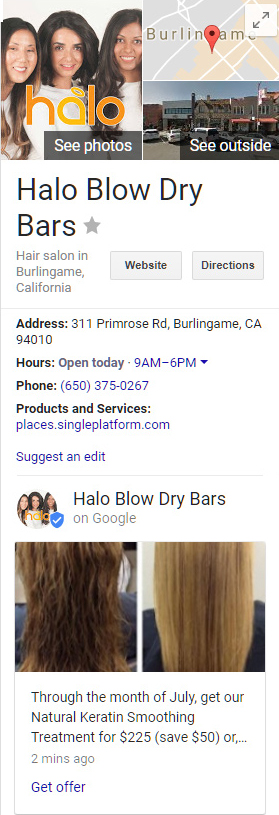
Google My Business Listings show on the right side of a Google search engine page.  Please see the sample listing For Halo Blow Dry Bars.

*Now, Google is offering a free ad posts which shows within your listing.  Please see the Keratin ad on the sample listing.

Ads can be up to 300 words, include a graphic, and a call to action: “Learn more,” “Reserve,” “Sign up,” “Buy” or “Get offer.”

Ads are designed to be dropped from the listing after one week, but if you want an ad to run continually, we’ve got a work-around to do so.

We manage the Google My Business Listings for several clients and are contacting them about adding a promotion.

Please contact John to set up your business listing – or to add one of these new promotional resources to your existing listing.


CATERING COMPANY RE-BRAND

Re-Brand

Last year our client, Palace Cafe Catering, decided to close their Sunnyvale cafe and focus entirely on the catering side of their business.  They have begun construction on a huge and fabulous new kitchen with offices in Belmont.  We are looking forward to participating in moving their business forward.  Thank you, Palace, for including us in your exciting new business plans.

Along with this move, they are updating their branding.  They’ve new colors, style, design, and fonts.  New print collateral is in the works and their new web site is almost ready for launch.

PREVIOUS AND NEW LOGO

blog-palace-logoNEW MAGAZINE ADS

blog-palace-gentry-ads

E-MAIL CAMPAIGN

Yesterday, we finalized their new e-mail campaign template and launched their Mardi Gras Menu.  As always, our mouths watered while we work – we know how delicious the food is.

MANGIA!

Save

Save

Save

Save

Save

Save

Save


AN ADWORDS CAMPAIGN DONE WELL

(2025 review – lots has changed over the last ten years, but you can see, much remains the same.)

Our client wanted to attract new customers for a high-value treatment they provide, and to help pay off the high-end equipment they just purchased.

If only one method of online advertising to get new clients is possible due to budget constraints, we always recommend Google AdWords campaigns, which reaches the largest audience in a targeted area, such as within a ten mile radius of your location.

We set up the campaign and wrote the ad copy, made a landing page, chose quality keywords and a specific method of keyword matching to maximize their daily budget.

We measure whether the ad is performing well in a few ways. (Please refer to the graphic below for the numbers in parentheses.)

  • Placement on the results page: Ideal positioning is either the first, second or third place on the page (6).
  • “Click Through Rate”: The percentage of time someone clicks on the ad (3) compared to the total number of times the ad is displayed. Above 0.5% is considered very good. It means the keywords we selected are a good match to what the user is seeing in the ad copy and is responding well to it.
  • “Conversions”: This is a big one. There are a number of ways to measure this, but it always refers to a way of tracking when the user takes a desired action. In this case a conversion is counted when the appointment form is submitted (7). The cost per conversion (8), is the total number of conversions divided into the total amount spent. In this case the cost per conversion is currently $89. Considering that the treatment being marketed typically brings in a few thousand dollars in revenue, paying ninety bucks for a likely new high-value client is money well spent.

adwords-screenshot

It should be noted that conversions don’t measure all of the success. Visitors who click on your ad may also call your business for an appointment from your phone number on the landing page (the page we create specifically for the ad offer), and even if they don’t call or make an appointment right away, they have seen your company name and your offer. Repeated exposure to your business is one of the keys to brand layering and attracting new business, so every click to your site furthers your efforts.

We realize most of our clients aren’t seeking such high-value clients where $90/conversion is a reasonable number. This is just one example. A reasonable cost for a new customer or sale depends on your business. And it is not always possible to track just how much new business you are getting from any sales promotion, but a well-executed AdWords campaign should be high on your online marketing agenda.

There are many more important aspects of Google AdWords, enough to fill books, but the info presented here is the very core of how to measure the success of such marketing campaigns.


INSTAGRAM ADS

blog-instagram-ads-header-ani-off

Instagram advertising allows you to reach a large and targeted market, using a variety of media, and with options for calls to action and objectives.

There’s an initial, one-time, set up phase which takes considerable time and work.  This is a project for John!

First, you’ll get the opportunity to consider your objectives which is a great way to solidify your goals and help you set in stone what will make Instagram advertising a success for your business.  We’ll have you choose one objective from the choices below:

Instagram Ad Objectives

These objectives will allow Instagram to funnel you to the best ad choice for your business.

We’ll then ask you to go through the targeting list below to be sure you are not paying for ads for people out of your targeted market.

City, state, region, country? Age range? Gender? Language?

You’ll also be able to target with user interest keywords.  For example, this sample ad we are setting up is for a pickleball lifestyle products company, so we are targeting anyone who has shown a social media interest in pickleball.

You may also narrow down your targeting by selecting mobile or desktop devices or both if that’s relevant to your ad and/or business.

Then there’s some general book-keeping:

  • ad start and end date/time,
  • do you wish your ad to run all the time, or at just specific times each day,
  • how much do you wish to spend,
  • do you wish to be billed by impression or by click?

These are the ad options:
Instagram Ad Objectives

Carousel ads which scroll images or video upon which you may put a text caption.  We selected carousel for our pickleball client and that’s what’s shown in our header graphic.

Static, single image ads with text overlay.

Video ads, which can be a set of images with captions as a slideshow, or full video, up to 30 seconds.

Nearly done!

You’ll need a landing page.  We recommend a page on your web site which is customized to your Instagram ad.  It will be more effective and will allow you to better track your ROI.

What would you like your call to action to be? Apply Now, Book Now, Contact Us, Download, Learn More, Shop Now, Sign Up, Watch more?

Because Instagram is owned by Facebook, ads are actually set up through Facebook’s business portal.  You may also run these exact ads on Facebook which can be a big time-saver.

We’ll walk you through every step of the way.  We’ll also ask you how you would like to see reporting.


GOOGLE ADWORDS EXPANDED TEXT

Here’s John, enjoying his clients’ AdWords reporting on a summer day in the garden.  He says this the new expanded text Google AdWords are a really big deal.

blog adwords

Expanded text AdWords ads are the next generation of text ads, designed for a mobile-first world.  They benefit users with more information before they click an ad and benefit advertisers by giving additional control over messaging.  This can mean higher quality clicks from users with keen interest in the subject while cutting down on lower quality clicks less likely to convert to a sale.  They are also better-designed for device responsiveness and display more clearly on devices from smartphone to desktop monitor.

More bang for your AdWords bucks!

This is all fairly new, but early reporting is showing expanded text ads are getting a 20% higher click through rate.  This is mostly because they are larger and stand out amongst the older, smaller ads.  Right now, we’re suggesting that we upgrade any old-style AdWords campaigns we have running for our clients.

There’s two main updates. The headline (purple text in the graphic below) can be 60 characters, rather than 25.  You can be more compelling and precise which leads to better quality clickers.  And, the ad display text (black text in the graphic below) has been expanded from two 35 character lines to a consolidated 80 character line.

This graphic shows how an expanded text ad will display on a smartphone vs. a monitor:

cs-ad-screenshot


Summary – better quality clickers = better quality conversions.

Google AdWords is a specialty of John’s.  Contact him at johnp@metapix.us or 408 252-8664 with any questions.

Save

Save

Save

Save

Save

Save

Save

WHY WE DON’T RECOMMEND MAILCHIMP

Gibbon Because We Don't Have a Photo of a Chimp(Yes, we know this is a photo of a gibbon yawning, not a chimp delivering mail – it’s all we have in our library primate-wise as we have not taken a photo of a postal chimp, although we’d be excited to do so.)

2025 update – we have one client on MailChimp, and can confirm from recent experiences that it remains the worst interface and requires arduous researching through their “help” sections rather than making their process intuitive and in line with the way small businesses work.

This was the situation back in 2016: We use MailChimp for a few clients and we find it to be the most difficult interface and address list management system of the e-mail campaign providers with which we have experience.

ONE – they don’t offer phone support.

TWO – Choosing the address list to whom the e-mail goes at step one instead of at the end of the development process causes problems and is contrary to the way our clients like to work.

THREE – They don’t have seed lists for testing.  This is a development issue for us, and does not affect our clients except for a bit of time added to the process, which adds to the cost to the project.

FOUR – The same address on several lists counts multiple times towards your monthly plan, so you can spend far more than is needed for your subscription.

FIVE – MC does not offer “pay-as-you-go” as an option – monthly subscription only.  You pay, even if you don’t send any e-mails.

SIX – Customization of address sign-up forms can only be done with a higher-priced account.

SEVEN – Sign-up forms that can be coded to recognize list segmentation can be done only on pop-up pages, but not for embedded forms (which is pretty much the only way people do e-mail list sign-up forms now.)

EIGHT – The biggie – they don’t allow a campaign to be sent to more than one list.  The best practice for managing lists in MailChimp is to have one list, which is divided into groups and segments.  Our clients find it confusing (actually we find it confusing at times), as well as cumbersome, non-intuitive, and time-wasting.


If you are interested, there’s more below on MC’s address list management.  But we don’t want to simply focus upon the negative and what we don’t recommend.  We do recommend using Constant Contact (although it’s far from perfect).  The phone response is good – customer support reps who know the product and are helpful.  And the list management is far simpler.  You can have as many lists as you want and get to select the ones you want each campaign to launch to.  Unsubscribes and bounces are well-managed at the account level, rather than the list level, which protects you from higher prices and grumpy customers and keeps you compliant with spam laws.


So, back to MC’s list management issues caused by not allowing a campaign be sent to more than one list:

  • Unsubscribes are managed by individual list, rather than at the account level.  So if you have more than one list, and a recipient unsubscribes from one list, it’s not recorded in any other list, so you can e-mail to an address of someone who already unsubscribed.
  • Because there’s no connectivity between lists, if a client changes their settings in one list, it won’t be recognized by any other instances of that e-mail address in other lists.
  • If you wish to send an e-mail to separate lists, you need to duplicate the e-mail over and over, sending one e-mail launch per mail list.  If there are duplicated addresses in your account, you will be sending the same campaign to these addresses.  One of our clients is doing this, and are getting complaints from clients.


We know this is confusing.  Send us a line with questions, or call 408 252-8664.

Save

Save

Save

Save