SMS (Text) Marketing with Constant Contact – A Beginner’s Guide

Summary First

For the busy small business owner!

  • Any text marketing requires a one-time, detailed licensing process.
  • Constant Contact is a great way to dip your toes into text marketing, but if it proves successful, you may soon wish to upgrade to a platform with more features, such as image support and more refined reporting. More on these platforms below.
  • Small businesses offering services may be better suited to Constant Contact’s text services than retail businesses.
  • With a short 160-character limit, we recommend using a landing page for details, a clear call to action, and fine print.

SMS – Short Message Service – a standard text message sent between mobile phones.

MMS – Multimedia Messaging Service – supports multimedia attachments in your text, such as photos, videos, GIFs, and audio, and allows longer message content.

Cost Before the Details

One-Time

There are so many variables in the one-time setup process, including a landing page template, that quoting the account setup here is not possible. For a quote to set up your Constant Contact account for SMS marketing, please set up a call with John.

Monthly

Constant Contact’s pricing, starting at $40 per month, is based on list size and the number of texts sent per month.

Each Launch

Each individual SMS campaign includes:

  • Communications regarding offer development, content, best practices, fine print, edits, and approvals
  • Writing copy for the text and landing page
  • Adding text and images to the landing page template
  • Testing
  • Launching

This is also a detailed process, but it becomes more efficient with repetition. As we learn your voice, preferences, and approval patterns, each campaign becomes easier to produce and more cost-effective. Initially, a rough estimate is 45 minutes to one hour per text. Our current hourly rate is $155.

Final Notes on Cost

We do not bill for a basic report delivered to your email a few days following each launch. More in-depth reporting is billed at our usual hourly rate.

It is possible to skip the landing page. Doing so saves setup costs and lowers the price of each campaign. You can link to any web page, but it is very difficult to use only 160 characters while also including the fine print needed – such as expiration dates, promo codes, and restrictions – to protect your business. Texts with a landing page perform better, generate higher-quality contacts, and require less in-store customer service.

Constant Contact

Constant Contact SMS marketing is best viewed as a lower-cost, lower-complexity entry point. The pros are affordability, convenience, easy integration with an existing Constant Contact account, and enough basic functionality to test simple campaigns.

The cons are fewer features, more basic reporting, no true MMS capability, and a registration process that can be frustrating if your business information is not perfectly aligned.

For many small businesses, that may be enough. Constant Contact can be a good first step to see whether bulk SMS campaigns are effective for your audience. But if texting proves to be viable and important, you may eventually need to switch to a more costly service with stronger reporting, MMS, automation, two-way conversation tools, and deeper sales or customer management features.

Constant Contact vs. Other Services

Constant Contact costs much less than many larger competitors, but it also does less. Platforms such as Podium, SimpleTexting, EZ Texting, Text Request, and Twilio generally offer stronger automation, richer integrations, advanced reporting, two-way messaging tools, and MMS support.

Podium is built more as a customer communication and lead conversion platform, combining texting with reviews, AI-assisted follow-up, inbox tools, and sales-oriented workflows. That can be valuable, but it usually comes with a much higher monthly cost.

Pros and Cons

Cost and Features Compared

The biggest advantage is cost. If you already use Constant Contact for email marketing, adding SMS can be an inexpensive way to test whether your audience responds to text campaigns. Some plans include a starter message allotment, and smaller add-on tiers are available for lighter usage. That makes it attractive for businesses still building an opt-in mobile list or sending occasional promotions.

The downside is the limited feature set. Constant Contact’s reporting covers useful basics such as sends, successful deliveries, bounces, unsubscribes, and URL clicks. However, it is not as detailed as platforms built for broader customer communication and sales tracking.

Podium and other larger systems may provide deeper dashboards, reply tracking, lead management, team inbox features, review generation tools, AI-assisted responses, and stronger integrations.

Another major limitation is multimedia messaging:

  • Constant Contact SMS is text-only. It is designed for plain text messages and links, not native image, video, GIF, or audio attachments.
  • SMS is short by design. A standard SMS message is limited to 160 characters per segment. Longer messages can be sent, but they are split into multiple billable segments.
  • MMS is different from SMS. MMS supports multimedia attachments such as photos, videos, GIFs, and audio, and allows longer message content.
  • This matters for marketing. If your campaigns depend on sending product photos, event graphics, coupons, before-and-after images, or branded visual promotions directly inside the message, Constant Contact may feel limited.
  • The workaround is linking. You can still link to a web page, image, video, landing page, or offer, but that is not the same as sending media directly in the message.
  • Competitors may offer more. Larger SMS platforms often include MMS support, richer creative options, and more advanced campaign tools, usually at a higher monthly cost.

One-Time Approval Process

A commitment of time and patience.

One part of SMS marketing that often surprises business owners is the approval process. Before sending campaigns, businesses must register so carriers can verify that the sender is legitimate and compliant.

That means gathering legal business details, your EIN or tax ID when applicable, official business name, physical address, website or business page, privacy policy, terms information, and proof that contacts are opting in. In practical terms, expect to gather records such as your business license and EIN documentation so your submission matches official records.

The approval process can take up to seven business days or longer in resubmission situations. Small discrepancies can cause rejection, including differences between your legal business name, address, EIN records, website information, or other registration details.

A minor mismatch can mean correcting the information and submitting it again. Expect a time commitment of at least a couple of hours, especially if you need to gather documents, verify legal information, update your privacy policy, or troubleshoot a rejection.

Thank You

We’ll guide you through! We’ve mastered all these details so you don’t have to.

We hope all this information has helped.

Contacting us puts you under no obligation – set up a chat with John, and we can see if we’re a good fit to help you with text marketing, either SMS with Constant Contact or MMS with another platform.


EMAIL MARKETING METRICS ARE FALSE (AND WHAT YOU SHOULD MEASURE INSTEAD)

WHY YOUR EMAIL MARKETING METRICS ARE LYING (AND WHAT YOU SHOULD MEASURE INSTEAD)


For years, reporting on open rates and clicks by mail marketing platforms, like Mailchimp and Constant Contact, was reliable indicators of engagement. Today, they tell only part of the story.

If you’ve noticed unusually high open rates or clicks that don’t seem to translate into website visits, phone calls, or sales, you’re not imagining things. Modern email privacy features and cybersecurity tools routinely inflate these metrics.

What Counts as an Open?

An open is recorded when a tiny invisible tracking image inside an email is downloaded. Years ago, that usually happened only when a real person opened the message.

Why Open Rates Are Inflated

Apple’s Mail Privacy Protection often downloads tracking images automatically, making emails appear opened even if they were never read. Corporate email security systems may also download images while scanning incoming mail for threats. One recipient using multiple devices can generate multiple opens as well.

Why Click Rates Can Be Inflated

Many business email security platforms automatically visit every link in an email before delivering it to the recipient. Their goal is to detect phishing sites and malware—not to interact with your marketing. Those automated visits can be recorded as clicks.

They’re Not Bad Bots

Most of this activity comes from legitimate privacy and security services provided by Apple, Microsoft, Google, Proofpoint, Mimecast, Barracuda, Cisco, and others. They’re protecting users, not trying to distort your reporting.

What Should You Measure Instead?

Treat open rates as a trend rather than a precise measurement. Focus more attention on unique clicks, website engagement after the click (Google Analytics is more important than ever), form submissions, appointments, purchases, replies, and other real business outcomes. Those metrics are far more meaningful than a headline open rate.

The Bottom Line

Email marketing remains one of the highest-performing digital marketing channels. The difference is that success is no longer measured by opens alone. Modern marketers should view opens as a rough indicator of deliverability and compare campaigns over time, while making decisions based on conversions and genuine customer engagement.


PROS AND CONS OF TURNING OFF THE “REUSE” SETTING FOR INSTAGRAM POSTS

Pros and Cons of Turning Off the


Instagram offers a variety of sharing and collaboration features designed to increase engagement and expand the reach of your content. One of those features is the “Reuse” setting, which allows others to repurpose or remix certain types of content, particularly Reels and templates.

For some businesses, this can be a valuable marketing tool. For others, especially brands that depend on maintaining a polished and carefully controlled image, turning the setting off may be the better choice.

Before changing your settings, it is worth considering both the advantages and disadvantages.

The Benefits of Turning Reuse Off

Turning off the reuse setting gives businesses greater control over how their content appears online.

Benefits include:

  • Greater control over your brand and visual identity.
  • Protection of original photos, graphics, and videos.
  • Reduced risk of your content being altered or associated with messaging you do not endorse.
  • A more premium and editorial presentation of your Instagram account.
  • Less opportunity for competitors to borrow your creative ideas or marketing assets.

For businesses that invest heavily in professional photography, video production, and custom graphics, protecting that investment can be important. Turning reuse off helps ensure that your content remains closely associated with your brand.

The Drawbacks of Turning Reuse Off

The biggest disadvantage is that it may slightly limit your organic exposure on Instagram.

Potential drawbacks include:

  • Fewer opportunities for followers to remix or share your content creatively.
  • Reduced participation in viral or trending content formats.
  • Less user-generated content from customers and fans.
  • Potentially lower social engagement compared with highly shareable accounts.

Brands that rely heavily on community participation or influencer-style marketing often benefit from keeping reuse enabled. Restaurants, fitness studios, retail businesses, and entertainment brands may find that allowing reuse contributes positively to audience growth.

Which Businesses Should Consider Turning Reuse Off?

Turning reuse off can make sense for businesses that prioritise professionalism, trust, and brand consistency.

Examples include:

  • Medical spas
  • Plastic surgeons
  • Physicians and healthcare practices
  • Attorneys
  • Financial professionals
  • Real estate professionals
  • Interior designers

These businesses are typically using Instagram as a digital portfolio and client acquisition tool rather than a social entertainment platform.

Why Medical Spas Should Pay Particular Attention

Medical spas occupy a unique position on social media. Clients are often making significant decisions about their appearance, wellness, and treatments based on what they see online. Your Instagram account is frequently their first impression of your professionalism and aesthetic standards.

For medical spas, maintaining control over how treatment photos, educational videos, before-and-after images, and branded graphics are presented can be especially important.

Turning off the reuse setting offers several advantages:

  • Protects professionally produced treatment and educational content.
  • Helps maintain compliance-conscious messaging.
  • Preserves the premium, luxury feel many medical spa brands work hard to establish.
  • Prevents branded content from appearing in contexts that may not align with your business values.

Unlike influencer accounts that benefit from widespread remixing, most medical spas gain new clients through trust, credibility, and consistent branding.

Our Recommendation

If your Instagram strategy is primarily focused on attracting qualified clients rather than maximising social engagement metrics, turning off the reuse setting is often a smart choice.

For medical spas and other service-based businesses, brand control is usually more valuable than the small amount of additional exposure that content reuse may provide. Clients are choosing you because of your expertise, aesthetics, and professionalism, not because your posts became part of a social media trend.

Instagram can still be an extremely effective marketing channel without allowing others to reuse your content. High-quality photography, educational posts, client testimonials, and a consistent visual identity will continue to do the heavy lifting when it comes to building trust and converting followers into clients.


WHY WE DON’T RECOMMEND SPECIFIC MED SPA EMR/CRM PLATFORMS

Why We Don’t Recommend a Specific Med Spa EMR or Practice Management Platform


We get asked a version of this question fairly often by medical spa owners and managers: do we recommend a particular med spa software platform?

The short answer is no.

That may sound surprising coming from a marketing partner that works with med spas, but there is a simple reason. Over the years, we have never had a medical spa client tell us they truly love their software vendor. Some tolerate it. Some work around it. Some are planning to replace it. But genuine enthusiasm for a med spa practice management or EMR platform is rare.

That does not mean there are no capable systems on the market. There are. Medical spas today can choose from platforms such as AestheticsPro, Aesthetic Record, Booker, Jane, Mindbody, PatientNow, Zenoti, Boulevard, Nextech, and many others. Many offer broad feature sets, polished demos, and strong sales messaging. But once a practice starts using one every day, the conversation usually shifts away from which platform looks best on paper and toward which one is the least frustrating fit for that specific business.

It helps to define the category clearly.

Medical spa practice management and EMR software is the software that helps run the clinical and operational side of a med spa. Depending on the vendor, it may include scheduling, charting, electronic medical records, consent forms, treatment notes, treatment photos, client records, inventory, memberships, point-of-sale, reporting, reminders, and various communication or marketing tools. Some vendors also describe their platform as having CRM functionality, meaning there may be features for lead tracking, follow-up, segmentation, texting, email, or promotions.

In other words, this is not just booking software. In many practices, it becomes the operational center of the business.

That is also why choosing a platform can be difficult. From the outside, many of these systems sound very similar. They all promise efficiency. They all promise better workflows. They all promise stronger retention, cleaner reporting, and a smoother patient journey. But once the staff is inside the platform every day, the tradeoffs start to become more obvious.

One system may be strong on charting but awkward on scheduling. Another may look attractive from a marketing standpoint but feel clunky operationally. Another may work well for a larger multi-location business but feel overly complicated for a smaller boutique med spa. Another may claim to be an all-in-one solution, but in practice the built-in tools can feel rigid or limiting.

That is one reason we are careful about making software recommendations.

At Metapix, our role is to help medical spas grow through branding, websites, content, campaigns, paid advertising, and lead generation. We work on the front end of visibility and growth. We help our clients present their services clearly, reach the right audience, and turn attention into booked appointments.

What we do not do is get involved in our clients’ patient management systems beyond the bare minimum needed for marketing coordination.

That boundary is intentional.

Once a platform touches protected health information, treatment history, prescriptions, charting, signed consents, provider workflows, or other sensitive patient data, the stakes change. HIPAA and related privacy concerns are real. Operational risk is real. Compliance risk is real. For that reason, we do not position ourselves as the people who should choose or manage a client’s EMR or patient management platform. That decision belongs with the owner, the practice manager, the clinical team, compliance counsel, and the people who work in that system every day.

Where our perspective does become useful is on the marketing side of these platforms, because that is where med spa software often starts to overlap with what we do.

Many vendors no longer market themselves as simple scheduling or records systems. They also want to handle email, SMS, reviews, loyalty, memberships, patient recalls, lead nurturing, and reputation management. Some offer fairly developed built-in marketing tools. Others rely more heavily on integrations with outside providers. Some try to do both.

On the surface, that can sound convenient. But convenience and flexibility are not always the same thing.

A medical spa may be told that its platform can handle all of its marketing needs, only to find later that the automation is basic, the templates are restrictive, the segmentation is limited, or the reporting does not line up with the clinic’s actual goals. In other cases, a platform may have perfectly decent internal tools, but the practice still needs outside support for landing pages, ad campaigns, website strategy, content, or more advanced email and retention workflows.

That is why we tend to look at this category in layers.

There is the clinical and operational layer, which includes charting, scheduling, inventory, patient records, documentation, compliance, and internal workflow. Then there is the marketing and growth layer, which includes positioning, website performance, paid ads, lead capture, nurture campaigns, reviews, retention, and reactivation.

Some platforms do a respectable job of covering both. Some clearly lean harder toward the operational side. Others are trying to become broader growth platforms as well. But no matter how the software is packaged, those are still two very different responsibilities, and they do not always belong in the same hands.

Sometimes those two layers can live comfortably inside one platform, and sometimes they work better when they are kept separate. What matters most is not forcing an all-in-one solution, but choosing an approach that supports the team, protects the practice, and leaves room for effective marketing.

That is where our perspective stays consistent. The right software decision is deeply tied to operations, compliance, and the day-to-day realities of patient management, which makes it too specific and too sensitive for an outside marketing firm to own. Our role is to help med spas grow around those systems through branding, websites, content, campaigns, and lead generation, not to operate inside the patient record. We believe that boundary is healthier for our clients, safer from a privacy and compliance standpoint, and better for the long-term relationship.


PLAN AND ORDER NOW FOR HOLIDAY MARKETING

holiday marketing table scape

After twenty years of helping clients with last-minute holiday panic marketing, these are some of the things we often regret not addressing in September.

As autumn begins each year, we remind our clients to start prepping and ordering gift bags, greeting cards, holiday decor, gift certificates, gift tags, posters, etc, and plan online marketing: e-mail campaigns, seasonal website changes, and AdWords campaigns.

Besides setting yourself up for a less stressful fourth quarter, preparation in September means free or economy shipping prices instead of ridiculously marked-up rush shipping for last-minute orders. (Reminder of our rush project policy.) You’ll also have more time to jump on the inevitable last-minute holiday opportunity or crisis.

SEPTEMBER TO-DO

Start a Halloween through mid-January calendar showing holidays, planned marketing campaigns, events, team meetings/training, and drop-dead dates.

  • Why into January? Because there’s often a drop-off in business in the new year. September’s the time to check into your previous January’s’ numbers (what worked, what did not) and also what your competition previously did for Q1 marketing.
  • Note drop-dead dates by working backwards from when you need assets finalized and in-hand. Remember that free or economy shipping may take longer over the holidays and plan accordingly.* For example, if you want a printed bring-back card to include with Halloween treats, note placing the order with the printer by October 17th, and working back from that, calendar planning and developing the asset starting a few weeks before that.
  • Calendar reminders to update your holiday hours over all platforms (especially Google Business Listings).

Research community calendars for events and reach out to potential partners and charities early. When you move forward be sure to plan offers that are trackable and unique to each event/partnership/charity so you have data for informed decisions next year.

Holiday Marketing

Prep a stash of beautiful, printed hand-outs with a generic offer so you have a stash ready and can jump on last-minute partnering opportunities without needing to rush a design and print order.

Check your gift card inventory now! (Gift card companies may have five week lead-times—and possibly longer October through January.)

Start penning your Thanksgiving gratitude message to customers, your holiday greetings, and your Happy New Year wishes so they are ready for social media and email campaigns. During the holiday rush, you won’t have as much bandwidth for sincere message scripting.

Are you sending cards, party invitations, and/or gifts to your clients and partners this year? Let’s get on that too!

Selling gifts? Check your inventory and the lead times of items you wish to stock. From October onwards, order fulfillment and shipping from your vendors may take additional time. Also, be sure you stock plenty of festive packaging and shipping supplies if you plan on mailing items.

Sadly, if you are hosting a holiday party and have not booked your caterer, entertainment, and venue, September may be too late. Skipping the printed invites and going online is a good option to save a few weeks.

Don’t forget your team! The holidays may be extra stressful for them too, so set them up for success and a bit of joy with prepared customer service scripts, holiday season incentives, and share with them your holiday marketing how-tos and goals. Start gathering their holiday plans for your shift schedule.

Plan software updates or IT work in advance.

No stress, added costs, and drama this year — let’s get started on marketing’s silly season work now! We’ve plenty of ideas and sources for product.

MenloVille Shoppe decorated for the holidaysHere’s some key events to keep in mind…

OCTOBER

Halloween

NOVEMBER

Daylight Saving

Veterans’ Day

Thanksgiving

Black Friday

Cyber Monday

DECEMBER

Pearl Harbor Remembrance

Green Monday

Festivus

Hanukkah

Christmas Day

Boxing Day

Kwanzza

New Year’s Eve

*This often trips up our clients—planning two weeks for free or economy shipping saves so much money and stress. Ideally, aim for three weeks for shipping so you have time to react if an exchange or reprint is needed.


MAIL LIST MANAGEMENT FAQ

Mail List Management FAQs

2025 – update. Very little of this info has changed since we first published this in 2017, so with a few edits, here’s updated info.

The answers below assume you are using one of the main email service providers. (Other than MailChimp as their list management is a struggle and contrary to the way our clients work.)

Q.
If the same e-mail address is on several lists in my account, will that person receive the e-mail campaign more than once?

A.
Short answer, no.

The service provider catches duplications and only sends the campaign to each address once. For example, say you have three lists in your account: Peninsula Clients, Marin Clients, and South Bay Clients. And Maggie Jones with address mj@gmail.com has visited your locations in San Jose and Palo Alto and so is on two lists. If you select all three of your lists to which to send an e-mail, the service provider will catch this and send only one to mj@gmail.com.

Q.
How do I get addresses to you to add to my account?

A.
You’ll need to export them from your internal system or database and send to us, usually as an Excel or .csv file attached to an e-mail. All databases, whether MicroSoft Outlook, gmail contacts, your POS system, etc, have a feature to export. Occasionally John visits a client to train them on how to export, but usually a few minutes Googling “export + your database type” gives adequate direction.

We prefer to work with an Excel doc. But we have also received email lists as pdfs, hand-written addresses, and Word docs.

It is important to name the file to send to us uniquely and logically. For example, if the list is all clients, be sure to name it so – “acme-co-all-clients-022117.xls”, or if it’s just your VIP clients, “acme-co-vip-022117”. Including the date is also a good way to track the file in case we need to troubleshoot in the future.

Even more important, if you have more than one list in your account, be sure to communicate clearly to which list we are adding these new addresses.

Q.
How do I prevent an unsubscribed person from receiving mail from me?

A.
That’s one of the great things about e-mail service providers. Once a person is marked as unsubscribed, there’s no way that account will send to that address. Even if that same address is added to the account manually or through an upload, it will be blocked.

Q.
Can I log onto my account and edit lists myself?

A.
Any time. We don’t own your account; you do. We’ll be happy to point you in the right direction to handle your own list management if you like. For example, some of our clients save by manually updating unsubscribes who have reached out to them directly instead of clicking the required unsubscribe button.

Q.
I have a question regarding mail list management which is not answered here.

A.
E-mail John!

POLICY ON RUSH ORDERS

(Originally posted September 2015. Reposted 2025.)

Due to a terrible few weeks when many rush orders placed with a third–party were bungled by the vendor or delivered late (or both!), and we calculated a significant loss of time and money as we worked with the vendor on our client’s behalf to get reprints, a corrected order, or a refund, we have decided to change our policy on providing free customer support on rush order failures by a third–party.

Customer service time spent with third–party vendors on rush order failures may be billed to our clients at our regular hourly rate.

We know that rush orders are unavoidable and will continue to do all we can to meet any deadline, without any additional rush charges.

However, we are finding that more and more we are losing time and money responding to the issues that so often occur with a rush order or rush shipping. These issues arise from errors completely beyond our control, either from a client who has put off addressing a project or deadline, or a vendor or shipping company which has not met their promised service. Our hope is to always provide the best service and product to our clients, so we generally step in to do all we can to fix any issue, although we are not at fault and although this customer service work can be time–consuming and costly to us. This cost to us in this lack of fault and high–risk situation has led to this new policy.

Of course, if it was an error or delay on our part that caused the need for a rush, you will get our full, un–billed support until the issue is resolved.

Addressing deadlines and projects well ahead of time will prevent the high–risk rush order. For example, order all your holiday season items such as decor, gift bags and wrap, and stocking stuffers in the fall. That way you are not putting pressure on a vendor to rush a job and they can do their best work, checking and proofing as they go, and packaging it in a quality manner to prevent shipping damage. If your item arrives early and is damaged or not as promised, you have plenty of time to get a replacement or refund without impacting your deadline.

To help prevent rush shipping up-charges, we keep to a fast turn–around time. We are happy to help our clients plan ahead and keep to a schedule. We can track down third party standard lead–times if requested, so a project management schedule can be prepared in advance.

The ultimate deterrent to procrastinating and ending up in rush-order-territory? The mark–ups for rush orders by third parties are astronomical.

WHY SECURE SITES ARE NOW A BIG DEAL

Is your site secure?


IF YOUR BUSINESS HAS A WEBSITE AND YOU CARE ABOUT GOOGLE SEARCH, YOU NEED TO KNOW THIS. Yes, all caps!

I know this is the type of detailed techie info to which many of our clients are averse.  But it’s key.

The main things to know are that we’ve got your back, we can take care of this, and it’s not going to cost you a lot.  Good?

Extra good news…if you are one of our clients and your site is hosted by our partner, NeuronLinks, or our MPS server, the hard part is being done for you – FOR FREE!  Thank you, Raj and John, for including this extra as part of your clients’ web hosting package.

And super good news…only businesses with credible websites will be making these updates.  (If and when someone tells them about the issue.)  By implementing these changes toot-sweet, you could get some google bounce while non-HTTPS sites will be penalized.

We’ll be reaching out to our clients, if we have not done so already, or, please contact John at johnp@metapix.us or 408 252-8664.  Many of our clients have just asked us to “handle this” – we will certainly do so, and can quote for any time spent on site review and/or coding before we start if you wish.

Here’s the details (it will be easiest to understand if you use a desktop or laptop computer)…

(2018 update: The info below and the graphics are captured from the Chrome browser on a desktop on date blog was posted. All browsers have changed the way they display security info. Now, if you see an icon with a locked padlock, you can assume the web page is secure. If you see an icon displaying an exclamation point, an open padlock, a circled i, or the words, “not secure”, you do need to read further for the fix.)

Secure Web Site https

Here’s a view of a secure site. (And some pretty photos of great hair to break up the tech details.  You’re welcome.)

If you click to every page of the Halo site, you’ll see an icon of a locked padlock to the left of the domain name. It shows this is a secure site because it’s host is using SSL Certification* and it’s using the HTTPS secure website protocol.**

If your site shows a locked padlock icon on each page, you can stop reading – you’re good.

This is a big deal because soon Google will be flagging and penalizing any website that is not using SSL Certification for their websites—that is, if links don’t start with https://.

If each page of your site is not secure, browsers may show warnings that make it seem your site is not safe, especially when forms are displayed. And there will be a reduction in your website’s ranking in Google organic (non-paid-for) search results.

From here, two steps need be taken.  1) set up of SSL certification on your server and 2) review and coding of your site to set up HTTPS secure website protocol.

1)

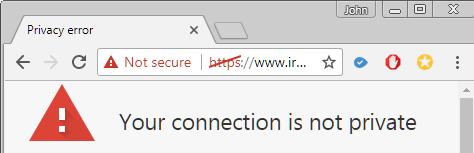
If your website is hosted by a company other than Neuronlinks or MPS, you’ll need to check whether your server is already supporting SSL. It’s easy to check, just type in “https://” followed by your domain name. You will immediately see the green lock if SSL has been set up (if you are on Chrome on a desktop/laptop.) If it has not you will see this message:

https not set up


You’ll need to review each page of your site – not just your home page.  Contact John if you’d like us to do this site review for you.

If you go to your website, in Chrome, and see this little iconnon-secure website icon it means that page is not secure and will be docked by Google soon. You’ll need to ask your web hosting company to switch your site to SSL. Good hosting companies should be offering this free of charge.
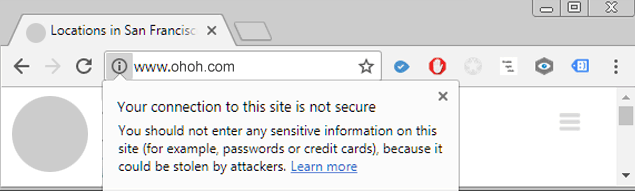
non-secure website notification


2)

Once your site has SSL certification, the next step is to review your site for HTTP issues and make corrections.  And then add code to move to HTTPS.  Our charge for this work will vary depending upon how your site is coded, if you have separate blog, store, database, and/or mobile site, and how many pages on your site.

If you’d like help in updating your site, please contact John at johnp@metapix.us or call 408 252-8664.

*SSL Certificates are small data files that digitally bind a cryptographic key to an organization’s details. More info at https://en.wikipedia.org/wiki/Certificate_authority.

**HTTPS secure website protocol – “S” for secure.  More info at https://en.wikipedia.org/wiki/HTTPS.

SWITCH YOUR INSTAGRAM ACCOUNT TO A BUSINESS PROFILE

If you use Instagram to promote your business you can take advantage of new business-only features by converting your account. We are recommending that all our clients who have an Instagram presence do this.

instagram accounts for business
 

When you switch, you will have the following new features and tools:

  • A “Contact” button is automatically added to your public Instagram page. You can choose to provide a phone number, email link, business address or any combination of these.
  • You can connect your Instagram account directly to your business Facebook page and invite your Facebook friends to follow you on Instagram right from your Instagram account.
  • You can learn more about your followers and see how your posts are performing with Instagram’s metrics tool, “Business Insights”.
  • You can create promotions and ads to help grow your business.
  • Instagram is promising more features in the near future.

Upgrading to a Business Profile takes some effort, and requires connecting to your business page on Facebook. Please contact John if you would like us to upgrade your account.